Core concepts
Your decisions
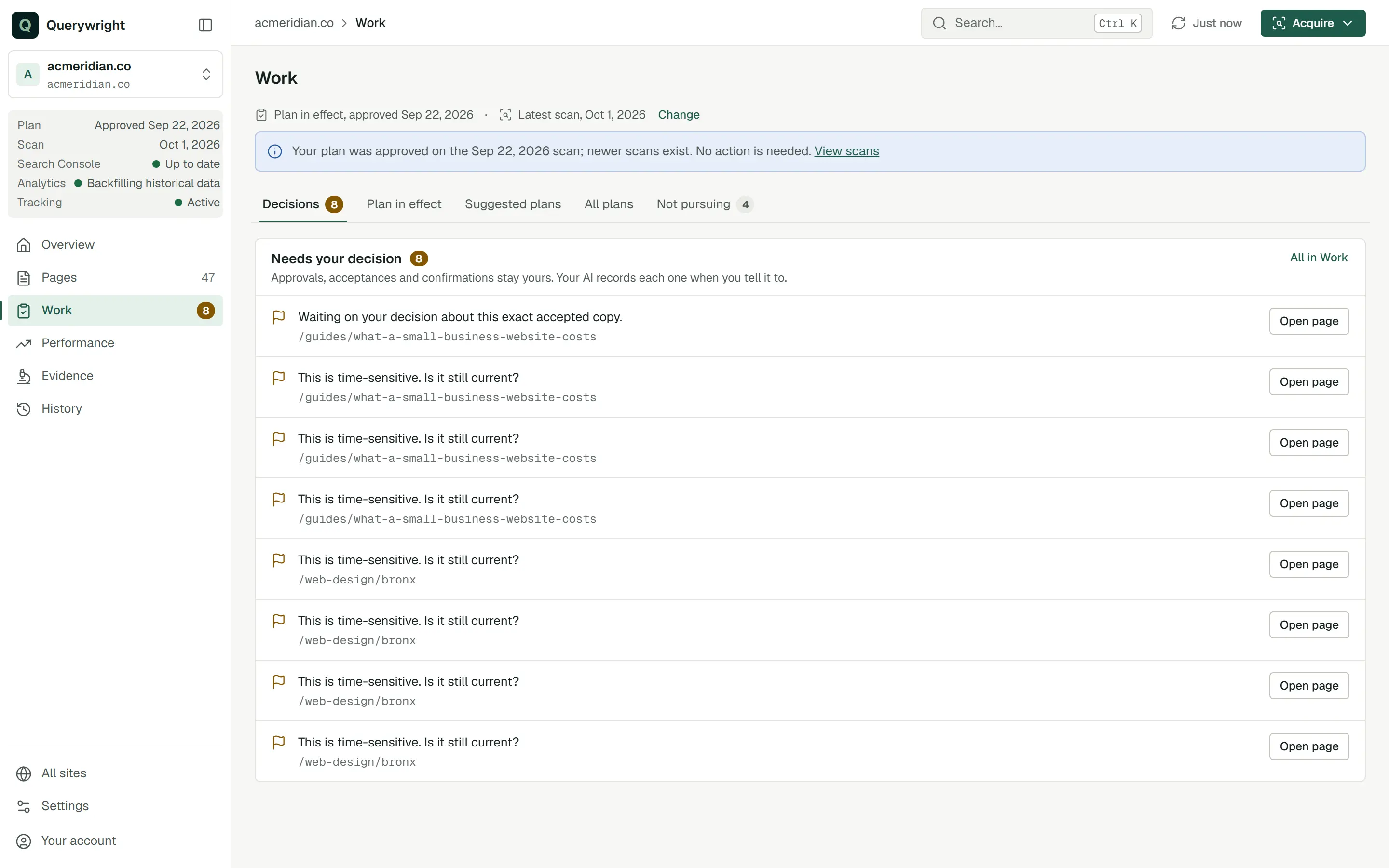
Querywright never approves, accepts or confirms anything on its own, and your AI may not decide for you. These are the decisions that wait for your word.
A decision is a choice only you can make about one exact thing: this suggested plan, this version of the copy, this statement, this search. You make it in Claude or ChatGPT, in your own words, and your AI records it in Querywright. Nothing is decided by silence, by your AI’s assessment, or because an earlier decision looks similar.
The decisions that are yours
| Decision | What you are saying yes to | Where it shows in the App |
|---|---|---|
| Approve a plan | One exact suggested plan, as your AI showed it: every page, target search and search left out. Until you approve, nothing in it takes effect. | Work › Suggested plans while it waits. Once approved, Work › Plan in effect shows it “by you, through your AI”, and All plans marks it “Approved by you”. A declined plan shows “Declined”. |
| Accept the exact copy | One exact version of the page copy, together with the review notes your AI showed you with it. | The page record, “Copy approved”. If the text changes, the page asks you to “Review and accept this copy again”. |
| Confirm a statement | That a factual statement in your accepted copy, one Querywright cannot verify from its evidence, is accurate and that you stand behind it. | The check: “Ready to publish · 1 statement confirmed by you”. |
| Settle a check decision | Your answer to one open item in a check, about the copy you accepted. | “Ready once you decide N things” until each is settled. |
| Recheck an ongoing decision | That a condition you settled earlier is still current, and when to check it again. | The check’s decision recheck. |
| Not pursuing | That you will not pursue an exact search (in its market), a page, or a suggested plan. | Work › Not pursuing. Searches to look into shows “You said: …” beside the search. |
| Name a listing as yours | That a business listing found in Google’s local results is your business, or that none of them is. | Performance › Local, “Confirmed by you” or “You said none of these is yours”. |
| Say a key event is a business outcome | That a Google Analytics key event, such as a form submission, counts as a lead or sale for you. | Performance › Analytics, “Business outcome (you said)” or “Not an outcome (you said)”. |
| Pursue a link source | That you will, or will not, pursue a link from a named domain. | Evidence › Links, “Link sources you pursue” with your words, or “Link sources you are not pursuing”. |
| Enroll rank tracking | That weekly Google rank checks start for your published pages, from your included tracking allowance. | Performance › Rankings, Enable rank tracking. |
| Let your AI use allowance | One concrete request: these searches in this market, these link snapshots, this page read in a browser. | Settings → Usage counts what was used. |
Publishing is also yours, and it happens outside Querywright. A check that passes does not mean the page is live. After you publish, your AI can scan the page and compare it with the copy you accepted; see live comparison.
What counts as saying yes
- Explicit words about the exact thing shown. “I approve the plan you just showed me for /services/plumbing, exactly as shown” is a decision. “Looks interesting”, “analyze this” or silence is not.
- The version you saw. A yes covers the version your AI showed you. If you say “change this”, your AI makes a new version and asks again. A decision about an earlier version does not carry over.
- One decision at a time. Approving a plan does not accept the copy. Accepting the copy does not confirm the statements in it. A passing check does not mean the page is published, and publishing does not enroll tracking.
- Changed text needs a new acceptance. If even a sentence of accepted copy changes, you accept the new version before it is checked.
- A yes to allowance covers that request. Agreeing that your AI may measure ten searches in one market covers those ten, not the next batch.
- Your words are kept. For not pursuing, link sources, listings and key events, your AI records what you said, and the App shows it as “You said: …”.
Querywright records the decision your AI reports. It does not verify who typed it. A confirmation prompt from Claude or ChatGPT itself, asking whether the AI may call a tool, is your AI app’s safety step, not a Querywright decision.
I approve the plan you just showed me for /services/plumbing, exactly as shown. Record it.Don’t pursue ‘cheap plumber’ for this site. Note that, and don’t suggest it again.What is not your decision
Some records look like decisions but are not:
- Searches your AI left out of a plan. When your AI proposes a plan, it can list searches it chose not to target, with its reasons. That is your AI’s rationale, approved along with the plan, not a separate decision by you. The App says so beside the search.
- Candidates. Searches to look into lists candidates from your evidence. Nothing in the list is approved, dismissed or measured until you say so.
- A step tagged You. It names a decision that is waiting. It is not a recommendation to say yes.
Changing your mind
Every decision can be revisited, and the earlier one stays in History. Tell your AI to reopen a search or page you set aside; Work › Not pursuing says “Tell your AI if you want to reopen one.” New evidence about a search you set aside appears in Searches to look into under “New evidence since you set it aside”, and the App notes that new evidence does not overturn your direction. A different direction for a page means a new suggested plan for you to approve.
Does it use allowance?
Making a decision uses none. Two decisions start allowance use: letting your AI run a request that uses an included allowance, and enrolling rank tracking, which uses the included tracking allowance every week.
Last updated