Work
Live comparison after publishing
Querywright cannot see you publish. After you do, a new scan of the page and a live comparison show whether the copy you approved is what the live page now says.
A live comparison compares your approved copy with a newer scan of the published page. You publish the copy yourself, in your own CMS or code. Then your AI scans the page again and asks Querywright to compare the scan with the exact text you accepted, using the claims from your check. The comparison is saved as its own “Live comparison” record. It needs no new plan, brief or acceptance: the plan, the page and the copy are unchanged, and only the live page is newer.
What Querywright records
| Field | Meaning |
|---|---|
| Live page | Whether the approved copy was found on the page in the newer scan, and that scan’s date. |
| Comparison result | Fixes, decisions and checks the scan could not decide, reported separately from whether the copy was found. |
| Scan compared | The newer scan the comparison used, kept beside the scan your plan was approved on. The newer scan is not approved by this; it is only compared. |
| Lineage | The plan, approved copy and check the comparison belongs to. |
“Found” has an exact meaning. The approved SEO title, meta description and the body’s blocks appear, in order, in what the scan read from the page. Presentation differences, such as curly quotation marks or punctuation at the edge of an element, do not count as changed copy. It does not mean the whole page is identical to the approved copy, and it is not Google’s view of the page.
The live page line
On the page and in Work › Plan in effect, the Live page line says what the newest comparison found:
| Line | What it means | What to do |
|---|---|---|
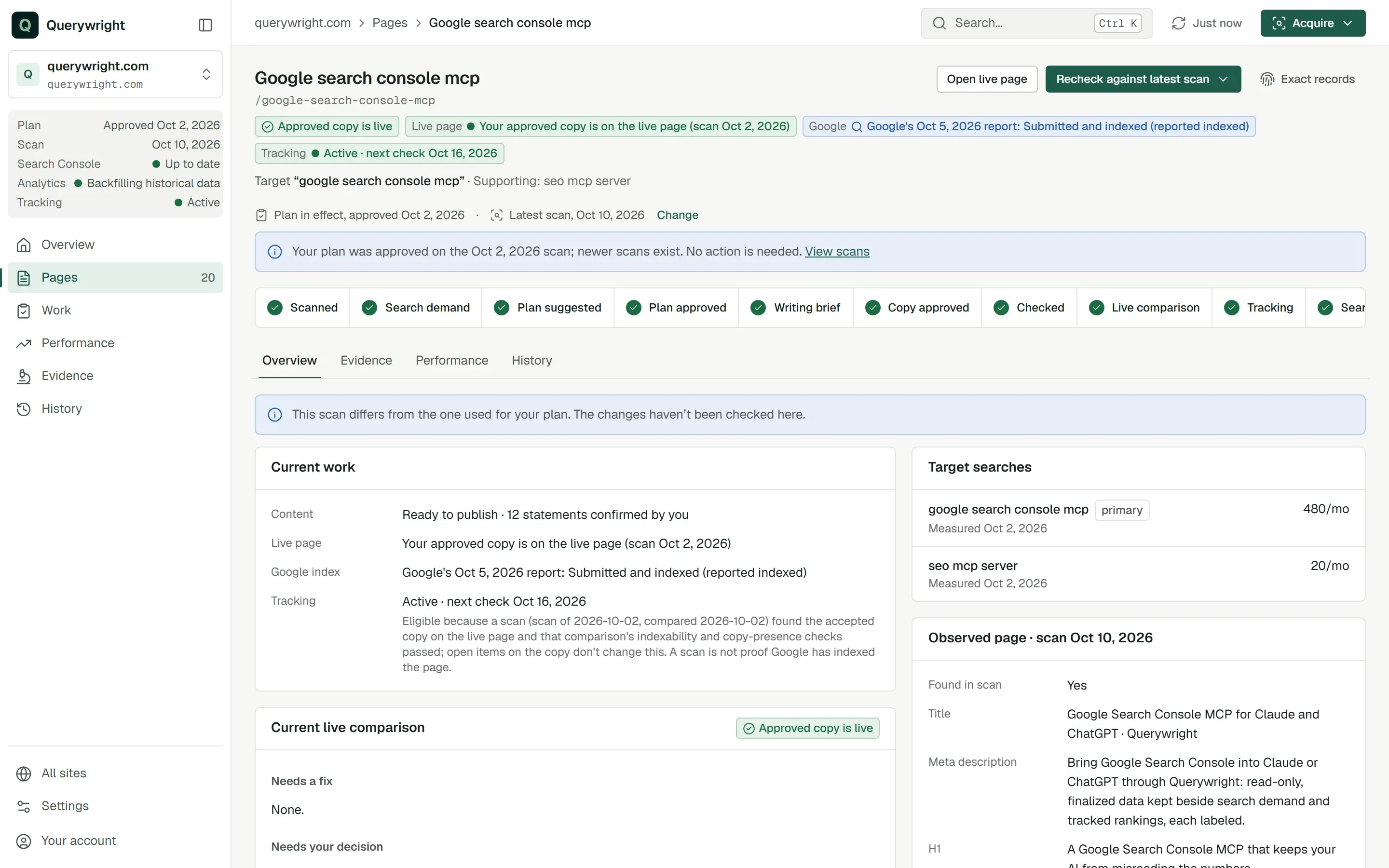
| “Your approved copy is on the live page” | The copy was found, with the date of the scan. The page status reads “Approved copy is live”. | Nothing for the copy. Consider rank tracking. |
| “Your approved copy wasn’t found on the live page” | The scan read the page and the approved copy was not in it. | Check what was published, then scan again and compare. |
| “Your approved copy wasn’t found in the live page’s visible text” | The words were not found in the text a visitor sees. | Check how the page displays the copy. |
| “Part of your approved copy is on the live page only inside hidden elements” | Some of the copy is in the page but hidden from view, so it is not counted as live. | Decide whether it should be visible. |
| “Not checked against your live site yet” | No live comparison has been made since the check. | Publish, then ask for a comparison. |
| “The last scan couldn’t show this page’s copy” | The scan did not read enough of the page to decide either way. | Scan again, wider if needed. |
| “Two live checks share a date; choose one with your AI” | Two comparisons have the same latest date, so neither is picked for you. | Choose one with your AI. |
When the copy was found but some checks need a wider scan, the status reads “Approved copy is live; some checks need a fuller scan”.
Coverage limits
A comparison can only decide what the newer scan observed:
- A partial scan can show the copy is present. It cannot show it is absent.
- If the copy mentions other pages or links to them, a scan of the whole site is needed to check those references. A scan of one page leaves them as checks it could not decide.
- A check the scan could not decide is never a fix and never proof that something is missing.
- A statement declared with no evidence stays a fix even when the live page shows its words, because the page is only repeating the copy.
Checked under earlier rules
Querywright’s comparison rules can change between releases. If a saved comparison flagged something that the current rules, reading the same saved scan, do not flag, the page reads “Checked under earlier rules; compare again” and its next-action button reads “Compare again in your AI”. The earlier flag stays listed as a note that says so, not as a fix. Nothing on the page is changed until your AI compares again.
What it does not claim
Where it shows in the App
- On a page, the status chip and the Live page chip show the newest comparison. The page’s first tab shows it under Current live comparison, and the journey strip marks “Live comparison”.
- After a check is “Ready to publish”, the page’s next-action button reads “Recheck against latest scan”. It opens the handoff to continue in your AI.
- Once approved copy is found live, the Since your copy went live panel on the page’s Performance tab lines up rankings and Search Console from the date the copy was first observed live. That sequence is not cause.
- The saved comparison is a “Live comparison” record in History.
I published the new copy on /services/plumbing yesterday. Scan it again and compare the live page with the copy I approved.What you decide
Does it use allowance?
The comparison itself uses no allowance. The new scan counts toward Sites researched only if it is the first successful scan of that site in the period, so scanning a site again later in the same period uses nothing more. See allowances.
Last updated