Core concepts
Measured zero vs no data
Zero is a measurement. No data is the absence of one. Querywright never turns one into the other, and neither should your AI.
When Querywright asks Google Ads how often a search is made, there are four possible answers, and they mean different things. A measured zero is Google Ads answering with a count of 0. No data is Google Ads answering without a count. Not checked means nobody asked. The check failed means the question was asked and no answer came back. Querywright keeps all four apart in every record and every table, and your AI is told to do the same.
What Querywright records
The App shows a search demand measurement in one of these words:
| What you see | What it means | What it does not mean |
|---|---|---|
| “About N searches a month” | Google Ads measured a number above zero for this exact search, location and language. | A promise of traffic, or that the search fits your page. |
| “Google Ads reports 0. That’s their count, not proof nobody searches it.” | Google Ads measured zero in this context. | That nobody searches it, or that the topic has no value. |
| “No data from Google Ads for this search” | Google Ads returned no measurement. | Zero. There is no number to compare. |
| “Not checked” | This search has not been measured in the evidence you are looking at. | Zero, or no demand. Relevance is only your AI’s hypothesis. |
| “The check failed. Try again.” | The measurement was attempted and failed. | Anything about the search. |
| “Search data is unavailable right now. Try again later.” | The data source could not be reached. | Anything about the search. |
In tables the same states appear in short form: a number, “0 measured”, “no data”, “not measured”, “didn’t finish” and “unavailable”. The absence states are shown in a neutral colour, so none of them reads as an error.
The same rule elsewhere in the App
Querywright applies the same discipline to everything Google reports:
- Search Console. A search or page with no row is not a zero. Google limits the rows it reports, so a missing row can mean Google did not report it. The page view says it directly: “missing rows are not zero”. Impressions are exposure, not search demand.
- Google Analytics. A total stays empty until every day in the period is complete, rather than showing a partial sum as the whole. A key event with no rows on the complete days shows “no data”; one with incomplete days shows “partial”.
- Links. When the link data provider holds nothing for a subject, the App says the provider holds no data, “not zero, and not proof that none exists”.
- Page experience. When Google has too few real users to report field data for a page, that is missing data, not a good score.
- Rankings. “Not in top 50” is said only when the check reached the full depth and Google returned results. A check that failed or came back short says so instead.
For Search Console in particular, see Search Console and the Google Search Console MCP overview.
Where it shows in the App
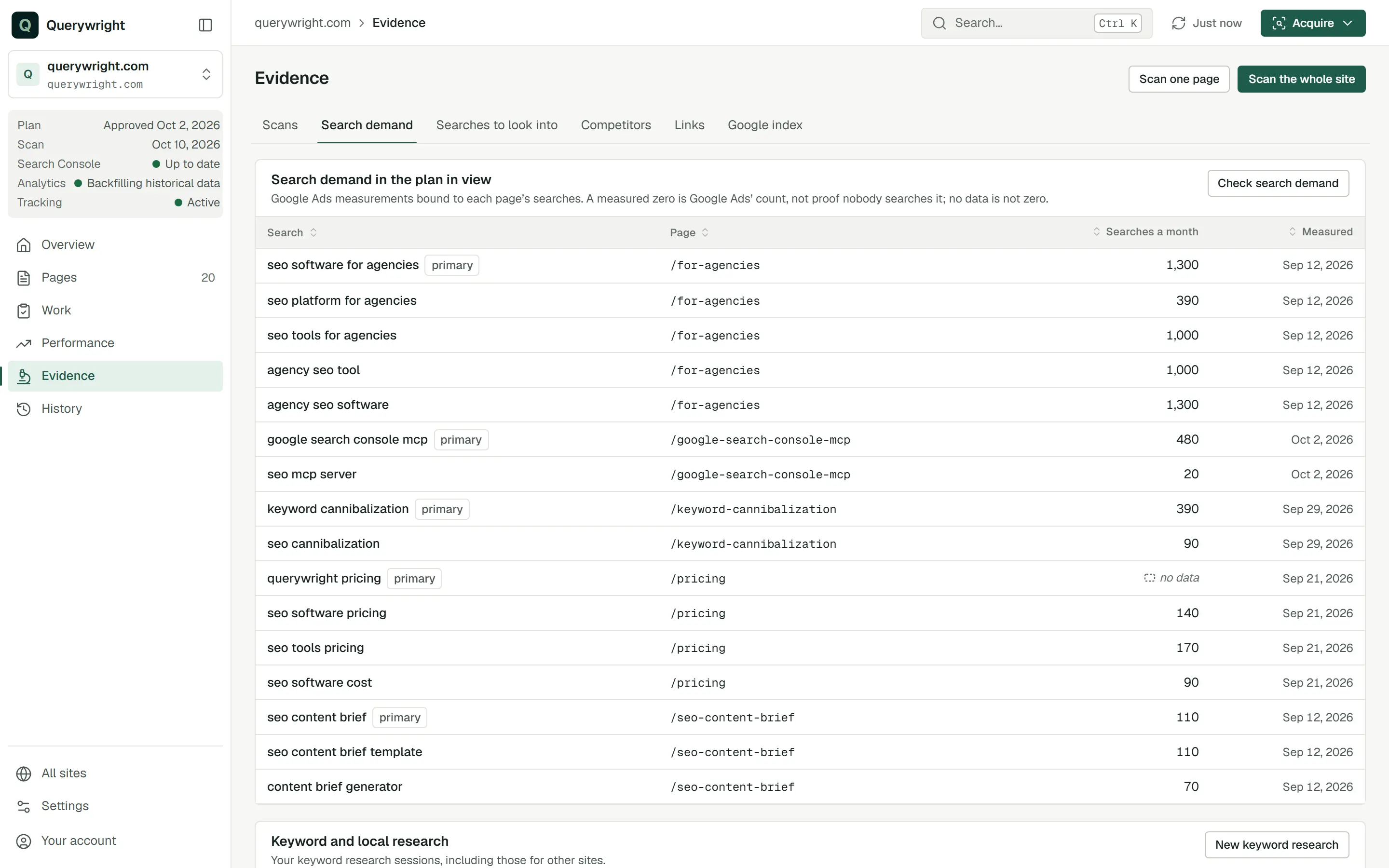
Evidence › Search demand shows each target search in the plan in view with its measurement and the date it was measured. The panel repeats the rule: “A measured zero is Google Ads’ count, not proof nobody searches it; no data is not zero.”
Does it use allowance?
Reading a measurement you already have uses none. Measuring a search that is “Not checked” uses Keyword measurements, and your AI asks before it does. See allowances.
Last updated