Getting started
How Querywright works with your AI
Querywright records and checks. Your AI reasons and writes. You decide. Each step of the loop leaves a dated record you can open in the App.
Querywright is an SEO operating layer that Claude or ChatGPT drives for you. You ask your AI for SEO work in plain language. Querywright scans your site, measures search demand, saves Google’s results, issues writing briefs, checks the copy you accepted and observes what Google does afterwards. Your AI reads that evidence, recommends and writes. You make every decision. The App is where you see the work and what is waiting on you.
Who does what
| Who | Does | Does not |
|---|---|---|
| Querywright | Scans your site, measures search demand through Google Ads, saves Google’s results, issues writing briefs, checks accepted copy, observes rankings, Search Console and Google Analytics, and saves each of these as a dated record | Reasons about your business, writes copy, approves or accepts anything, publishes |
| Your AI (Claude or ChatGPT) | Reads the evidence, recommends which page should own which search, writes and reviews copy, and explains each recommendation | Invents a measurement, presents its own reasoning as evidence, records a decision you did not state |
| You | Approve plans, accept the exact copy, confirm statements, decide what not to pursue, say yes before included allowance is used, and publish | Keep track of record IDs: the App and your AI find every saved record from the site’s name |
The loop
Understand → Decide → Create → Check → Observe → Reconsider. Each step names who acts, what it leaves behind, and where you find it in the App.
Understand
Your AI asks Querywright to scan your site, or one page of it. Querywright reads the public pages, up to 200 in a site scan, and saves what it observed on each one as a dated scan. A page that was linked but not read stays unread; nothing about the site is filled in to cover a gap. More in site and page scans.
Your AI works out which searches might matter for your pages, then asks you before Querywright measures their search demand in a named market and language. Each measurement keeps its source and date. With your go-ahead your AI can also run keyword research for broader ideas, fetch Google’s current results for a search, and look at the competitor pages that rank.
- Who acts: Querywright records; your AI reads; you say yes before allowance is used.
- In the App: Evidence (Scans, Search demand, Searches to look into, Competitors, Links, Google index), Pages, and the Acquire menu.
Decide
From the scan and the measurements, your AI suggests a plan: which existing page, or which new page on your site, should own which target search, with supporting searches, its reasoning and what it is unsure of. Querywright saves the suggested plan and checks it mechanically. If two pages in one plan claim the same target search, the plan cannot be approved until one page owns it. If a search already belongs to a page in an earlier plan, you see which page and when it was approved. Querywright never picks a winner.
You approve the plan, ask for changes, or decline it. Your AI records an approval only after you give it, for that exact plan. “Analyze this” is not approval, and silence is not approval. A change means a new suggested plan, which needs its own approval. You can also tell your AI you are not pursuing a search, a page or a plan; it records that in your words.
- Who acts: your AI suggests; you approve or decline.
- In the App: Work › Suggested plans, Work › Plan in effect, Work › Not pursuing. A page in your plan shows “In your plan”.
Create
For each page in your plan, Querywright issues a writing brief built from the plan you approved, the saved scan and the measurements, including the facts the copy must not invent. The page shows “Writing brief ready”.
Your AI writes the copy from the brief: an SEO title, a meta description, one H1 and the body. It reviews its own draft against the brief and shows you the full copy with its findings. You edit it, ask for revisions, or accept it. Acceptance covers the exact text you saw; any later edit is a new version that needs its own acceptance. Approving the plan is not accepting the copy. More in approved copy.
- Who acts: Querywright issues the brief; your AI writes; you accept the exact copy.
- In the App: the page’s journey strip (Writing brief, Copy approved), the page’s History tab, and History. The page shows “Ready to check”.
Check
Before you publish, your AI lists the factual statements in the copy you accepted and points each one at the saved evidence that supports it, or says that nothing does. Querywright checks the copy against the plan, the brief and the saved scan. The result reads “Ready to publish”, “Ready once you decide N things”, “Nothing failed; some checks need a fuller scan” or “Needs fixes”. Where software cannot settle something, the check hands it to you: a statement only you can vouch for reads “Confirm this”.
You publish the page yourself. After it is live, a new scan lets Querywright compare the live page with the copy you approved; a match reads “Approved copy is live”. More in live comparison.
- Who acts: Querywright checks; you confirm statements and settle decisions; you publish.
- In the App: the page status, Work › Decisions, and History.
Observe
Once a page is live and you decide to start rank tracking, Querywright checks each target search weekly on Google desktop and mobile organic results, through the top 50, in the market where its demand was measured. It records the position and which of your pages held it, including when a different page of yours shows up instead. With Search Console connected, it imports the clicks, impressions, CTR and average position Google reports. With Google Analytics connected, it imports what organic visitors did after the click. All of this records what happened. None of it claims the work caused it.
- Who acts: Querywright observes; you start tracking, connect Google, name your local listing and say what a key event means.
- In the App: Performance (Rankings, Search Console, Analytics, Local, Page experience).
Reconsider
New evidence raises new questions: a search worth a look, a check decision that is due for a recheck, a different page of yours showing up for a target search. Your AI brings each one to you with the evidence; you decide, and the loop returns to Decide.
- Who acts: your AI asks; you decide.
- In the App: Overview › Needs your decision, Evidence › Searches to look into, Work › Not pursuing.
Where each step shows up in the App
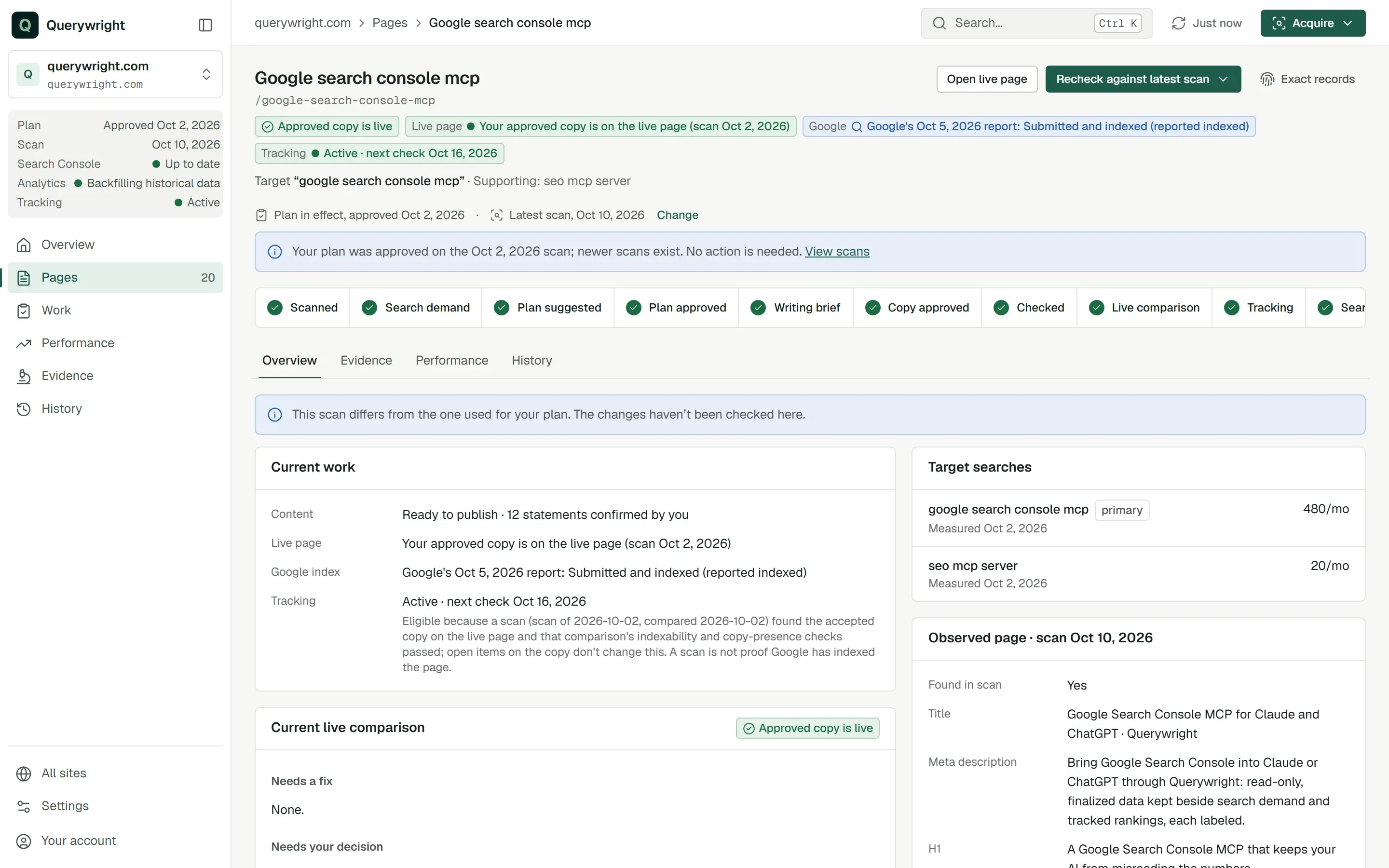
Every page in your plan carries a journey strip with the steps it has completed. The strip uses the App’s own labels.
| Step | Journey strip | Where to look | Who acts |
|---|---|---|---|
| Understand | Scanned · Search demand | Evidence, Pages, the Acquire menu | Querywright records; your AI reads; you authorize allowance use |
| Decide | Plan suggested · Plan approved | Work › Suggested plans, Plan in effect, Not pursuing | Your AI suggests; you approve or decline |
| Create | Writing brief · Copy approved | The page, History | Querywright issues the brief; your AI writes; you accept the exact copy |
| Check | Checked · Live comparison | The page status, Work › Decisions, History | Querywright checks; you confirm and settle; you publish |
| Observe | Tracking · Search results | Performance | Querywright observes; you start tracking and connect Google |
| Reconsider | back to Decide | Overview › Needs your decision, Evidence › Searches to look into | Your AI asks; you decide |
How each claim is labelled
Querywright keeps track of where each statement came from, and your AI is required to say the same when it reports to you. More in evidence and your AI’s judgment.
| Label | What it means |
|---|---|
| Observed | Querywright saw this on your site or in Google’s results, on a stated date. |
| Measured | Google Ads measured this search demand for a market and language, on a stated date. A measured zero is a measurement; no data is not zero (measured zero vs no data). |
| Reasoned | Your AI concluded this: a recommendation, a reading of a trend, a judgment of relevance. |
| Approved | You chose this: a plan you approved or copy you accepted. |
| Checked | Querywright checked the accepted copy against the plan and the saved evidence. |
Does the loop use allowance?
Reading saved work uses none. Scanning a site for the first time in a billing period, measuring search demand, keyword research, fresh Google results, links snapshots, rendered page reads, page experience reads and rank tracking use your plan’s included allowances, and your AI asks before it uses them. See when your AI asks first and allowances.
Last updated