Work
Checks
A check tests the exact copy you accepted against the plan, its brief and the evidence, before anything is published. It tells you what passed, what needs a fix and what needs your decision.
A check compares the approved copy for a page with the plan you approved, the writing brief it was written from and the evidence Querywright saved. Your AI asks for it and tells Querywright which factual statements the copy makes and what supports each one. Querywright then runs its checks on that exact copy and saves the result. A check happens before publishing, from saved evidence; it does not look at your live site. Publishing stays yours.
What a check can say
The result appears as the page’s status:
| Status | What it means | What to do |
|---|---|---|
| “Ready to publish” | Nothing needs a fix and nothing waits on your decision. It may add “N statements confirmed by you”. | Publish when you are ready, then ask for a live comparison. |
| “Ready once you decide N things” | Nothing needs a fix, and N decisions are yours to make. | Read each decision and tell your AI what you decide. |
| “Nothing failed; some checks need a fuller scan” | Nothing failed, but some checks could not be decided from the evidence available. | Decide whether a wider scan is worth it, or publish knowing those checks are undecided. |
| “Needs fixes” | At least one item needs a change to the copy or the evidence. | Ask your AI what to fix. Changed copy needs your acceptance and a new check. |
| “Needs a fix from your AI” | The open fixes are ones only your AI can make, and nothing waits on you. | Ask your AI to make them. |
A check that “Needs fixes” is still useful: it shows exactly which items failed and why.
What Querywright records
Each check is saved as a “Check” record. Inside it, items are grouped the way you read them:
| Group | What is in it |
|---|---|
| Needs a fix | Items that fail and need a change before the page is ready. |
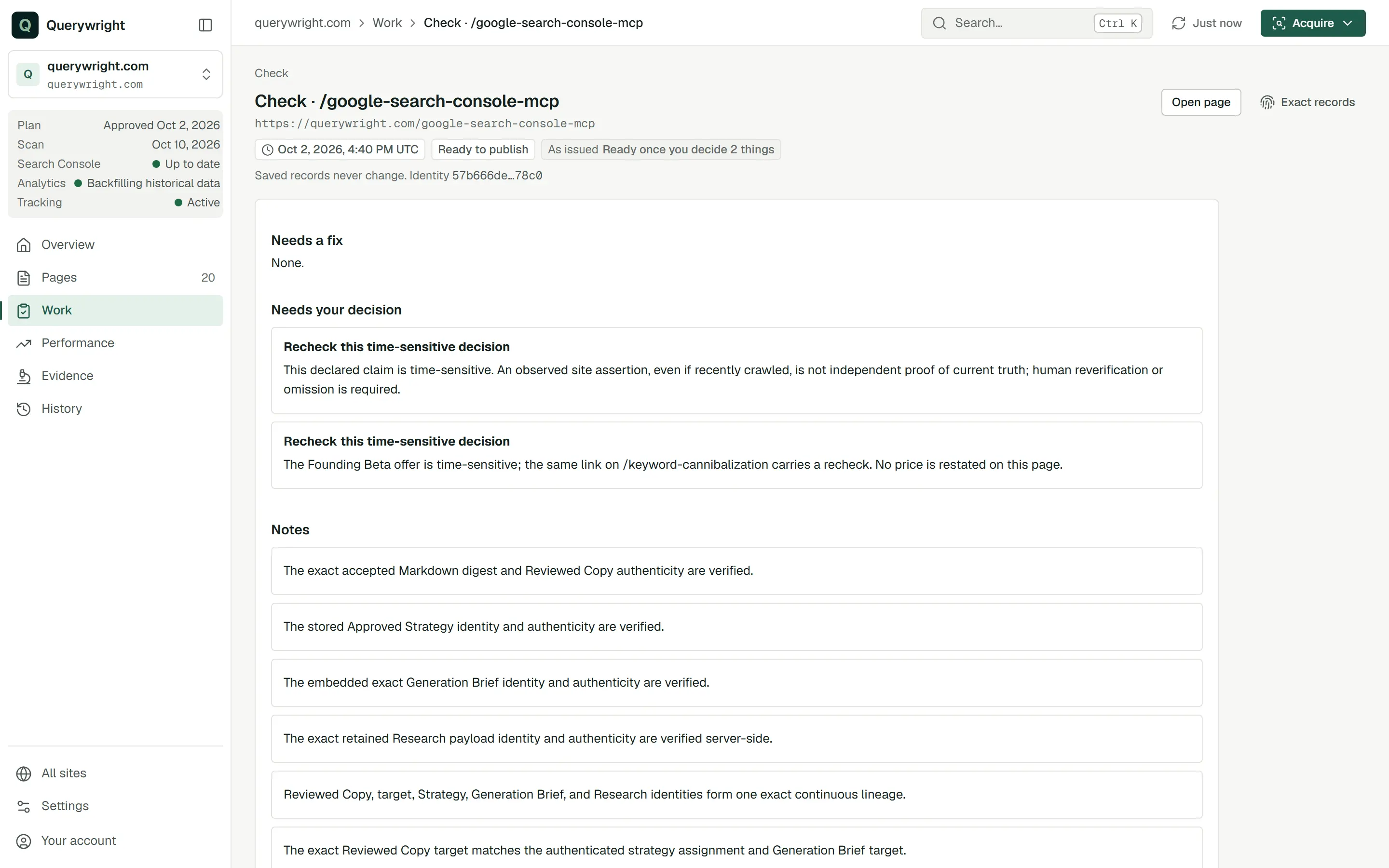
| Needs your decision | Items only you can settle, such as a statement Querywright cannot verify or a time-sensitive condition. |
| Notes | Everything else, including items already settled. An item can be marked “Included in your copy acceptance” or “Rechecked and still current”. |
Each item has one result:
| Item result | Meaning |
|---|---|
| “Passed” | The check found what it needed in the evidence. |
| “Needs fixes” | The check failed. |
| “Confirm this” | The item needs your decision. |
| “Check again” | The evidence behind the item may be out of date, so it needs checking again. |
| “Not enough evidence” | The saved evidence cannot establish the item either way. |
| “Needs review” | Any other result. |
Statements you confirm
Some statements in your copy, such as how long you have been licensed, are not in any evidence Querywright saved. Your AI asks you whether that exact statement is accurate and whether you stand behind it. If you say yes, your AI records your confirmation, and the result counts it as “confirmed by you”.
Your confirmation is your word, not Querywright evidence. The statement still reads as not verifiable from the evidence; the record adds that you confirmed it. If the statement or the copy changes, your AI asks again.
Yes, ‘licensed in Maryland since 2009’ is accurate and I’m comfortable standing behind it.Settling decisions
When the copy is unchanged, you settle a decision by telling your AI what you decide about that exact item. Your AI records it and runs the check again on the same copy. Running a check again is not a new approval, and it needs no new acceptance. If settling the decision means changing the copy, the changed copy needs your acceptance first, then a new check.
Decision rechecks
Some decisions are ongoing: a statement that stays true only while a condition holds, such as an offer or an opening time. When you tell your AI the condition is still current, it records a decision recheck: when you confirmed the condition, and the date to check it again, which you choose. The saved “Decision recheck” record shows “Rechecked”, “Next recheck” and “Trigger”, and notes that your AI reported the recheck and Querywright did not independently verify it. A recheck settles only that one decision. An item marked “Recheck this time-sensitive decision” is one of these.
New pages
A check on a new page runs before the page exists. Checks on the plan, the copy and your site’s context run as usual; checks that need the live page wait until after you publish and a live comparison can see it.
What it does not claim
Where it shows in the App
- On a page, the status chip shows the result, and the page’s first tab has a Pre-publish check result panel with the items grouped as above. A page waiting on you lists the decisions under Waiting on your decision.
- Work › Decisions lists what waits on you across the site. Work › Plan in effect shows each page’s check result in its Check column.
- The saved check is a “Check” record in History.
- When a page is “Ready to publish”, its next-action button reads “Recheck against latest scan”, the step after you publish.
Check the copy I accepted for /services/plumbing. Tell me what passed, what needs a fix, and what needs my decision.What you decide
Does it use allowance?
No. Running a check, running it again and recording a decision recheck use no allowance.
Last updated