App guide
Performance
How the site does in Google and with visitors, from stored observations only. Each tab keeps its own source and its own rules for what counts as complete.
Performance is the fourth section in the rail, at /sites/example.com/performance; press g then f to jump to it. Six tabs sit under the title: Overview · Rankings · Search Console · Analytics · Local · Page experience. Integrations at the top right opens Settings › Google Search Console.
About these numbers
Every tab ends with a collapsed note, About these numbers. It reads: “Every number here is a stored observation with its date and source. Google can omit rows; missing rows are not zero. Search Console impressions are exposure, not search demand, and its average position is not a rank check. Rank checks cover Google organic results in your plan’s measurement market. Analytics days count once they are complete in the property’s time zone. Sequence is not cause.”
Overview
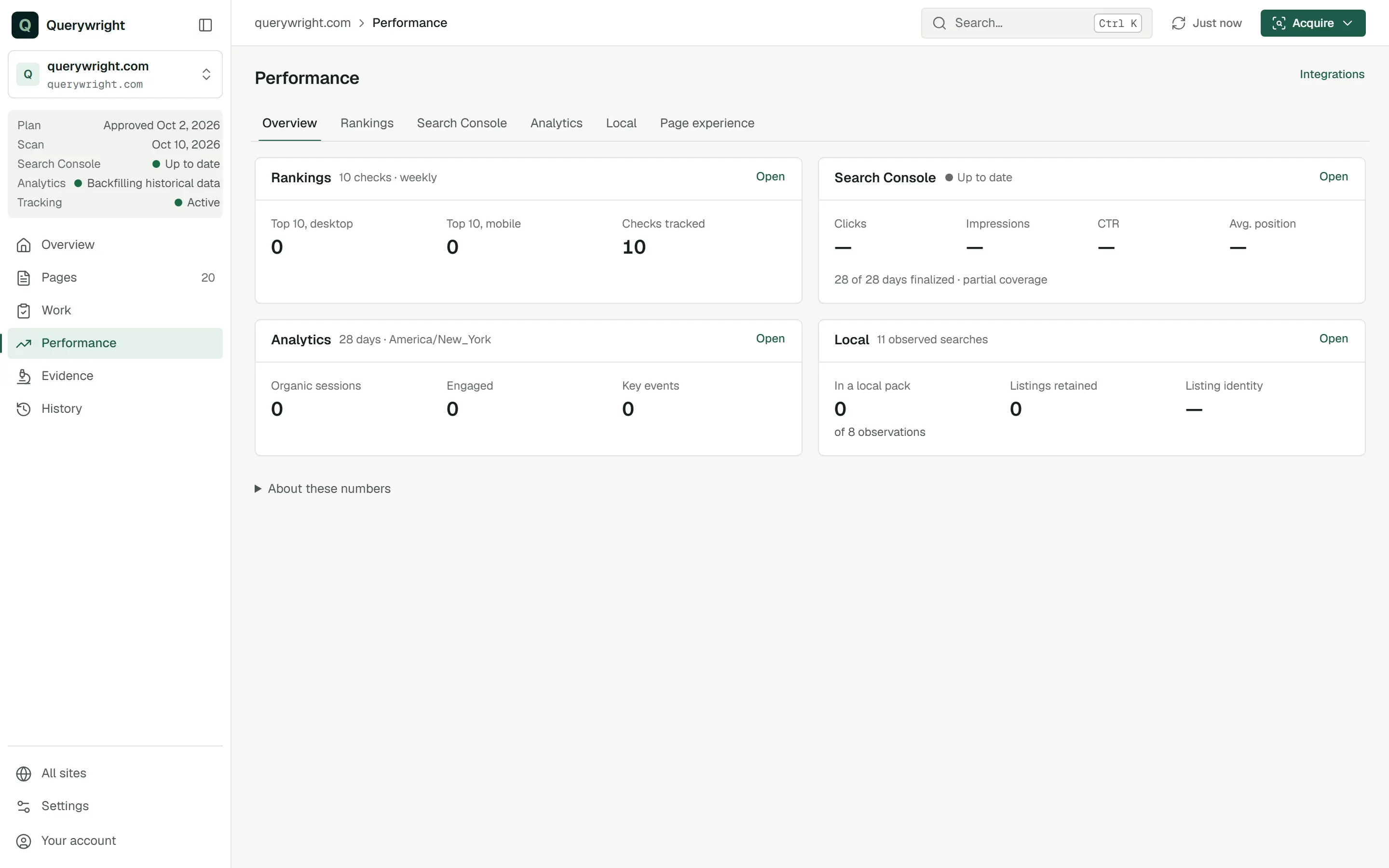
One panel for each source, each with Open to go to its tab:
| Panel | What it shows |
|---|---|
| Rankings | Checks tracked and how many are in the top 10 on desktop and on mobile, or “Not started”. |
| Search Console | The import state, Clicks, Impressions, CTR and Avg. position, and how many days are finalized, with “complete coverage” or “partial coverage”. |
| Analytics | Organic sessions, Engaged and Key events over complete days, or “Waiting for mature data. Each day imports once it is 72 hours old.” |
| Local | “In a local pack”, “Listings retained” and “Listing identity” (Confirmed or Undecided), or “No local observations yet.” |
A source that is not connected says “Not connected.”
Rankings
Where your planned pages show up in Google desktop and mobile organic results, up to the top 50, checked weekly for each device. The tab says how many of the pages in your plan are tracked. A page can join once its copy is approved and passes its check. See Rankings.
Starting and stopping
- Enable rank tracking starts weekly Google checks for the site. The tab asks you first to confirm your pages are published, because passing a check doesn’t mean a page is live.
- Update from your current plan brings tracking in line with the plan in effect.
- Stop weekly tracking stops the checks. Past observations remain available.
- Check desktop now and Check mobile now appear on a search that has not had its first check yet.
The counts
Searches tracked, Device checks tracked, Successful device checks this week, and Device checks that didn’t finish.
Each tracked search
A card per search, headed with the search, naming “Page you planned for this”. Its Desktop and Mobile sections each have:
| Field | What it shows |
|---|---|
| Position | The best position any page from your site held in that device’s latest check, or what the check found instead (see below). |
| Change | Movement from the first position observed: “+N from first position”, “No change from first position” or “No comparable position yet”. |
| Last checked | The date of the latest check, or “Not yet”. |
| Next | When the next weekly check can run, or “Stopped”. |
| Position shows | Meaning |
|---|---|
| #N | Your site appeared at that position. |
| Not in top 50 yet | The check reached the full 50 results and no page from your site was in them. New pages can take weeks to appear. |
| Not in the results returned, or Not in the N result pages returned | Google returned fewer results than asked for, and your site was not in them. Nothing is said about the top 50. |
| Not found in this check (depth unknown) | Your site was not found and how deep the results went is unknown. |
| Check didn’t finish | No valid answer that week. Nothing is known about the position. |
| Not checked yet | The search is enrolled and has not been checked yet. |
When a different page of yours is the one ranking, the card says your page “shows up instead” or “ranks above your planned page”, with its position. View desktop history and View mobile history list every check; the first check is the first position observed and doesn’t establish a before-and-after baseline.
Search Console
“How Google shows your verified site in search.”
- The import state, in bold, with its explanation. See Imports, backfills and incomplete periods.
- “30-day period ending” and the last imported date, with how many days are imported and finalized and “Complete coverage” or “Partial coverage”. A partial period lists why days are missing: before the import start, queued for import, not finalized by Google yet, or skipped after failed imports.
- Clicks, Impressions, CTR and Average Search Console position, and the previous comparable period when both are complete.
- Top searches and Top pages, each with clicks and impressions.
- Manage Google connection → opens the connection settings.
The tab adds its own About these numbers: Google can omit search and page rows, site totals and search or page totals cover different groups and shouldn’t be subtracted, and changes show what happened, not what caused it. See Search Console and Connect Google Search Console.
Analytics
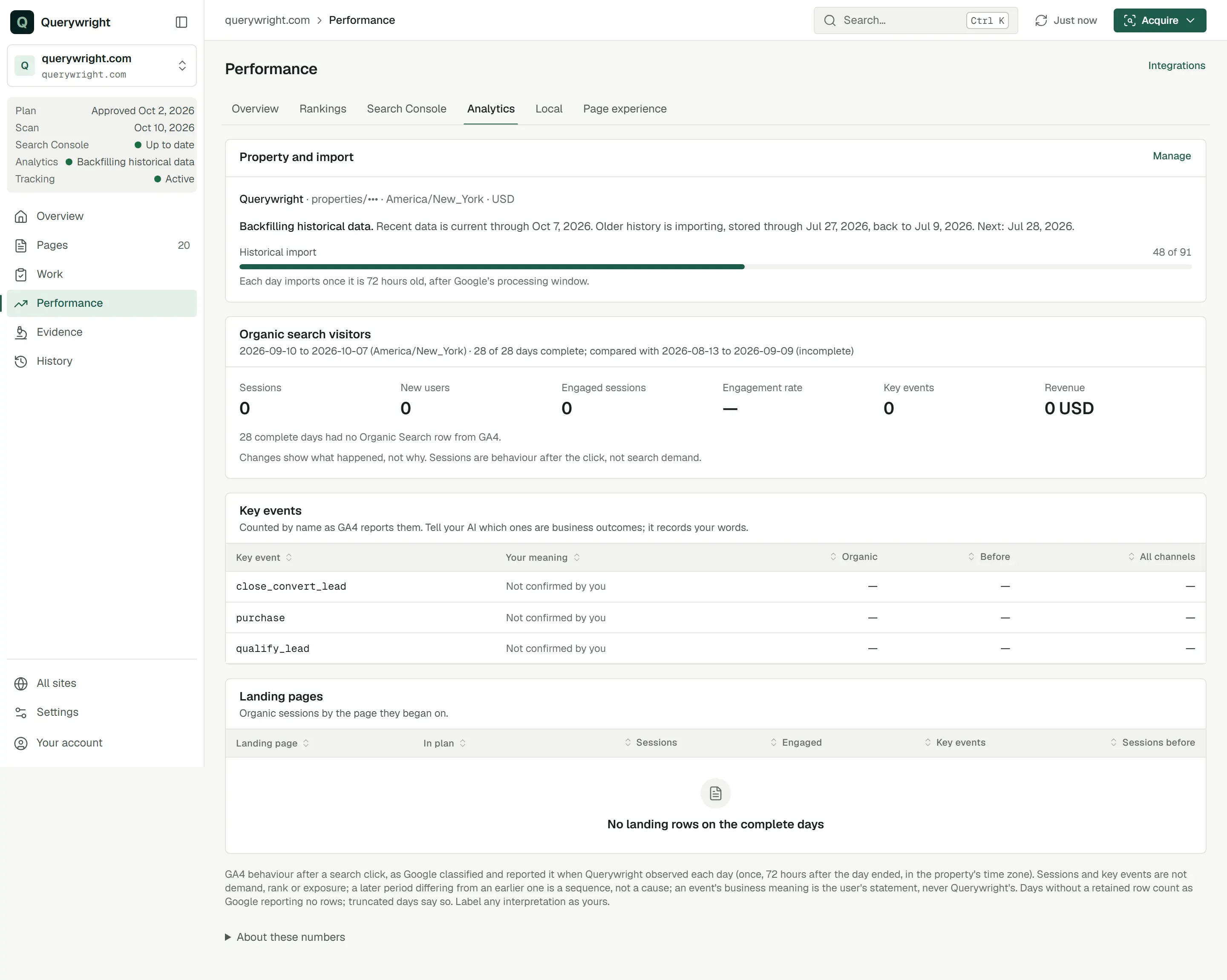
- Property and import: the Google Analytics property, its time zone and currency, and the import state. Manage opens Settings › Google Analytics.
- Organic search visitors: Sessions, New users, Engaged sessions, Engagement rate, Key events and Revenue over complete days in the property’s time zone, compared with the period before. Revenue reads “restricted by GA4” when the property withholds it.
- Key events: each key event by name, with Your meaning, Organic, Before and All channels.
- Landing pages: organic sessions by the page they began on, with whether the page is in your plan.
Until the first days import the tab says “Waiting for mature data”: each day imports once it is 72 hours old and the last 90 days import automatically. Without a connection it says “Google Analytics isn’t connected for this site” and offers Connect Google Analytics. See Google Analytics and Connect Google Analytics.
Local
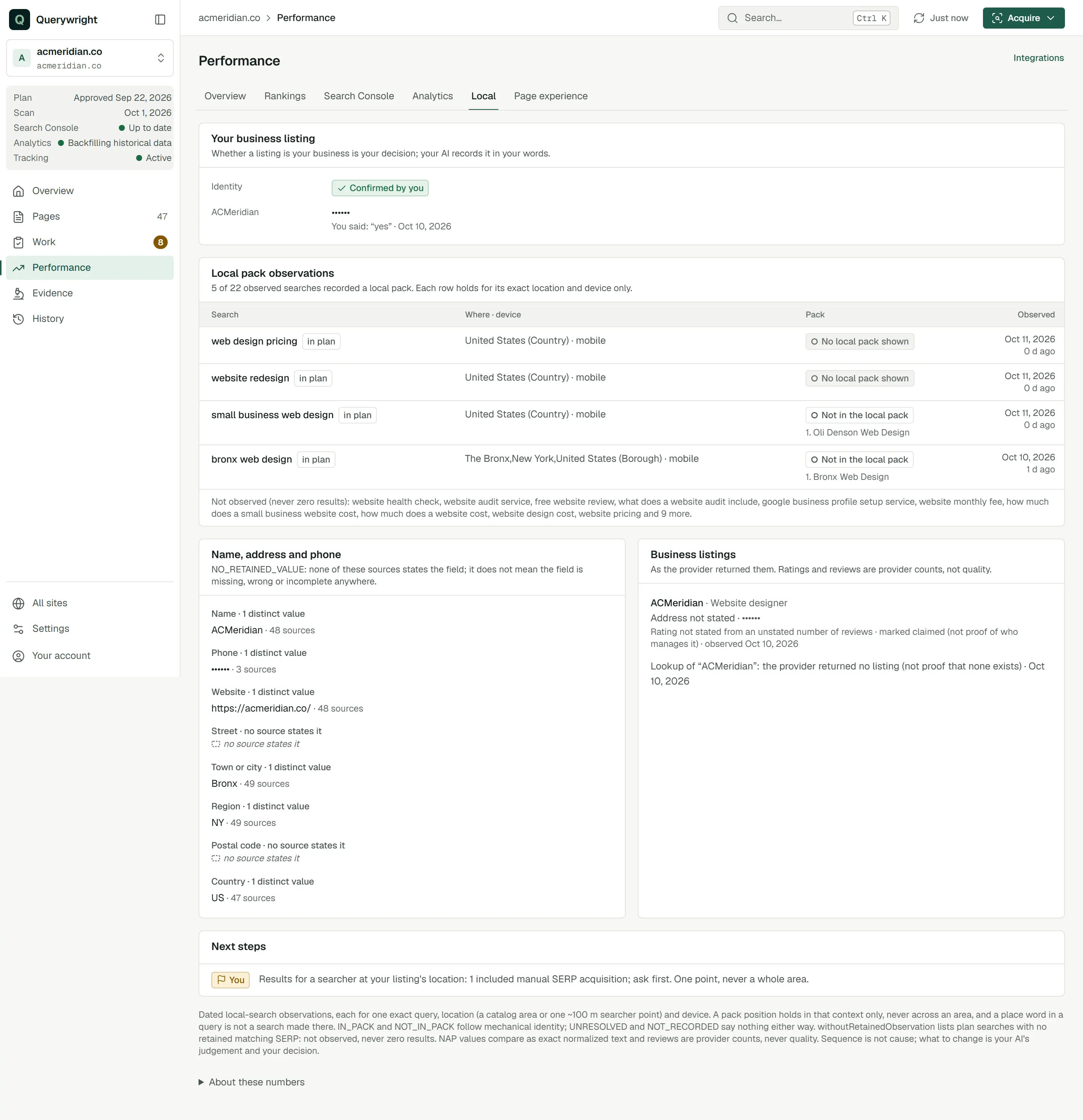
- Your business listing: whether a listing is your business, which is your decision: “Confirmed by you”, “You said none of these is yours”, “Needs your decision” or “No listing candidates retained”, with the candidates seen in retained evidence.
- Local pack observations: each observed search with Where · device, the Pack result and when it was observed. Each row holds for its exact location and device only.
- Name, address and phone: each field exactly as each source states it, with how many distinct values were seen.
- Business listings: listings as the provider returned them. Ratings and reviews are provider counts, not quality.
- Local search demand, when measured, and Next steps with actor tags.
Without observations the tab says “No local observations yet” and explains that your AI acquires local evidence with your approval. See Local SEO.
Page experience
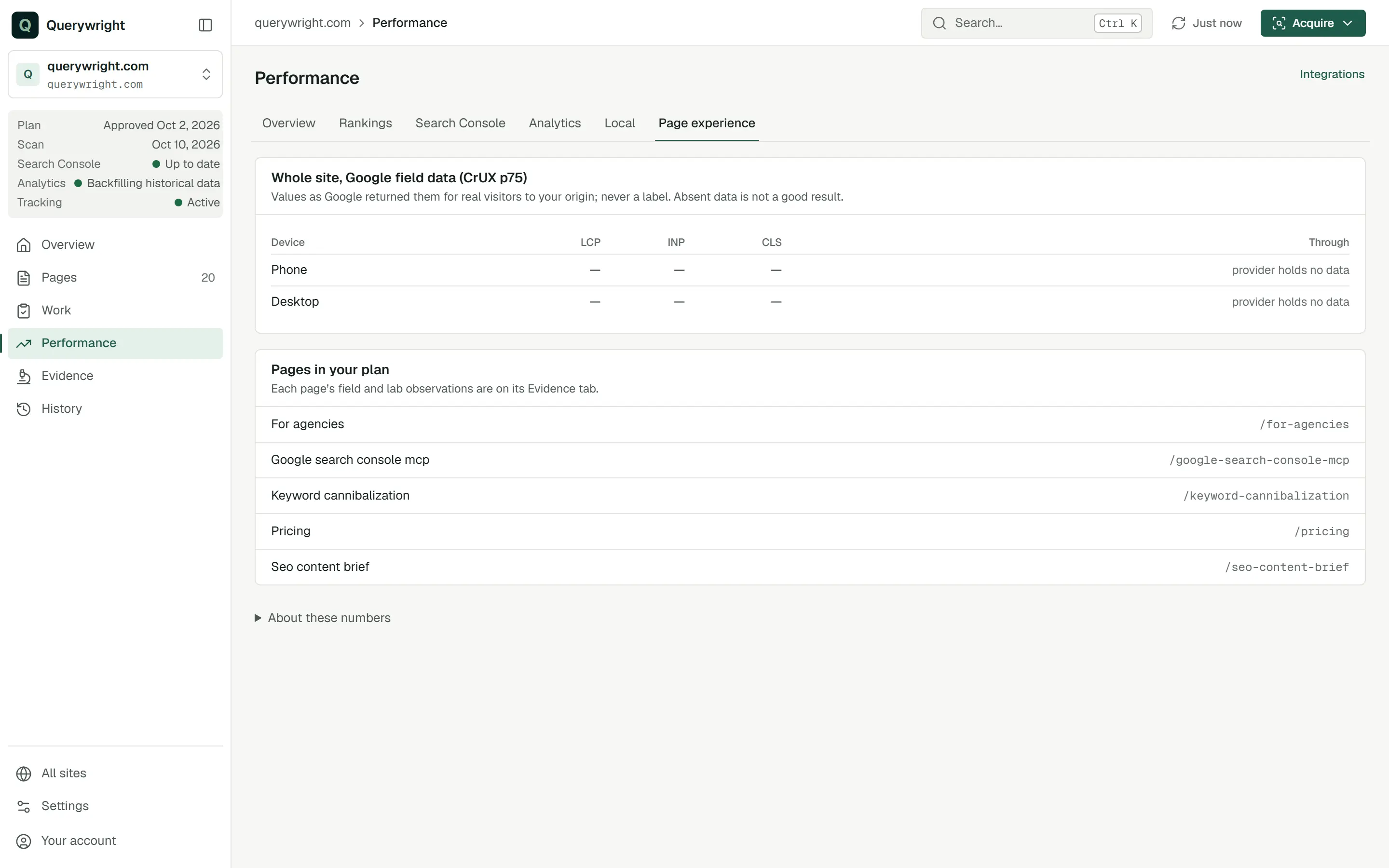
- Whole site, Google field data (CrUX p75): LCP, INP and CLS for phone and desktop, as Google returned them for real visitors, and the date they run through. “Absent data is not a good result.”
- Pages in your plan: each page links to its Evidence tab, where its own field and lab observations are.
When no field observation is retained, the panel says your AI can read Google’s field data once you agree. See Page experience.
Labels on this screen
| Label | Meaning | What to do |
|---|---|---|
| Not started | Rank tracking is not enrolled for this site. | Decide whether to start it once your pages are published. |
| Not in top 50 yet | The full top 50 was checked and your site was not in it. | Wait for later checks. A position past 50 is not visible here; it does not mean the page ranks nowhere. |
| Check didn’t finish | That week’s check got no valid answer. | Nothing. The next weekly check runs on schedule. |
| Partial coverage | Some days in the period are not imported or not finalized. | Read the missing-day reasons before comparing periods. |
| Waiting for mature data | Analytics days import once they are 72 hours old. | Nothing. It is not a sign of poor performance. |
| Business outcome (you said) | You told your AI this key event is a business outcome. | Tell your AI if that changes. |
| Needs your decision | Whether a listing is your business is undecided. | Tell your AI which listing is yours, or that none is. |
Last updated