Performance
Google Analytics
Search Console stops at the click. Google Analytics shows what organic visitors did next, imported read-only from your GA4 property, one complete day at a time.
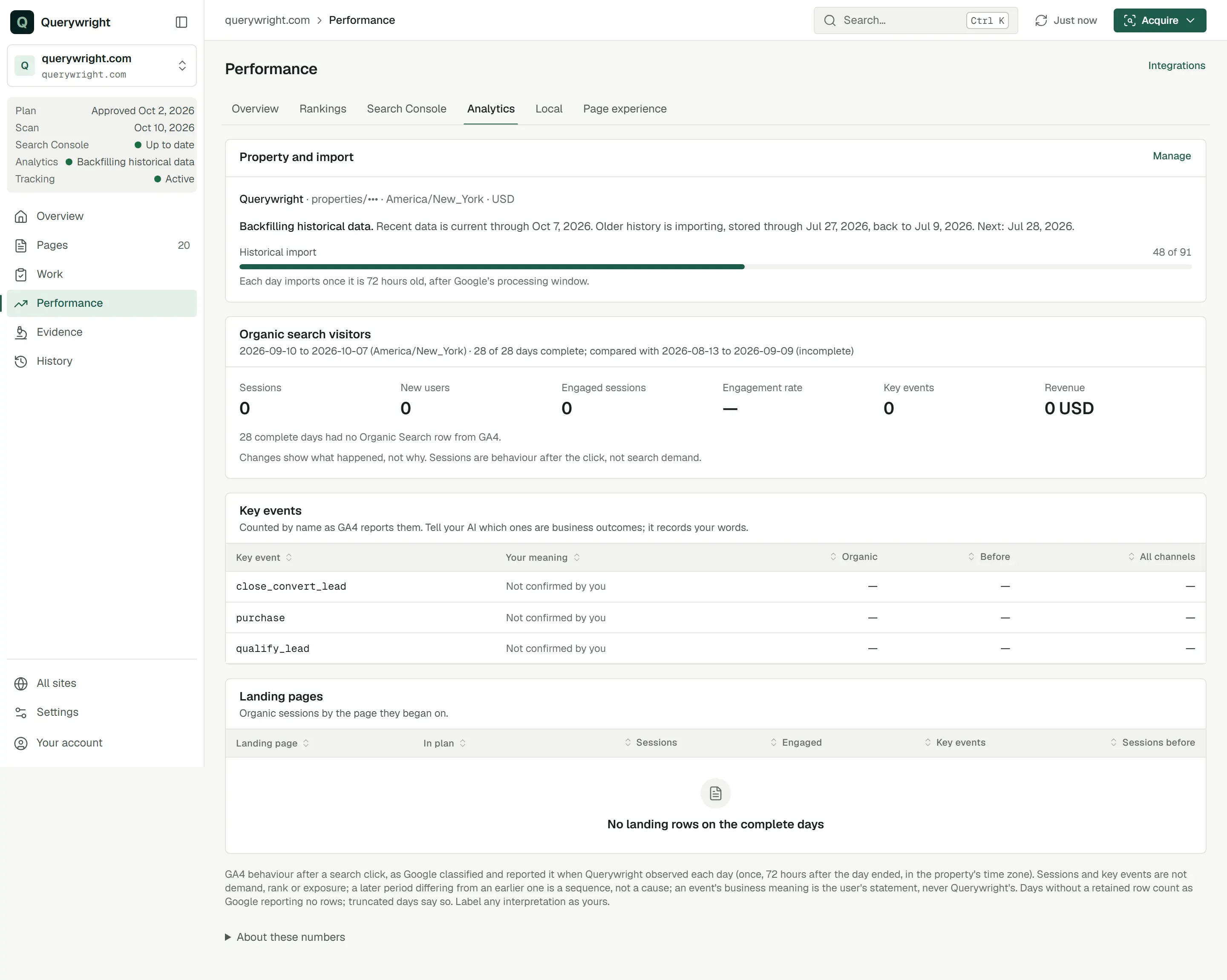
Google Analytics data in Querywright is what your Google Analytics 4 property reported about organic search visitors: how many sessions began from Google’s organic results, whether those visitors engaged, which key events fired, any revenue, and which pages they landed on. Once you choose a property for a site (see Connect Google Analytics), Querywright imports up to 90 days of history and then each new day. A day imports once it is 72 hours old in the property’s time zone, after Google’s processing window, and is not imported again. The access is read-only and separate from Search Console.
What Querywright records
| Field | Meaning |
|---|---|
| Sessions | Organic sessions: sessions GA4 placed in its own “Organic Search” channel. Querywright does not reclassify traffic. |
| New users | New users in those sessions. |
| Engaged sessions and Engagement rate | Organic sessions GA4 counted as engaged, and their share of all organic sessions. |
| Key events | Key events configured in your property, counted by name as GA4 reports them, for organic traffic and for all channels. |
| Revenue | Revenue GA4 reported for organic sessions, in the property’s currency. “restricted by GA4” means the property does not share it. |
| Landing pages | Organic sessions by the page they began on, with engaged sessions and key events. A landing page that matches a page in your plan is marked “In plan” and links to it. |
The period is the most recent run of complete days, up to 28, compared with the same number of days before it. The header shows the dates, the property’s time zone and how many days are complete. Totals appear only when every day in the period is complete; until then they show a dash. A missing number is not a zero, and when GA4 had no Organic Search row on a complete day, the tab says how many such days there were.
What a key event means is up to you
A key event is only a name until you say what it means. Querywright never decides that an event is a lead or a sale. Tell your AI which key events are business outcomes for you, and it records your words:
| Label | Meaning |
|---|---|
| “Business outcome (you said)” | You told your AI this event is an outcome that matters to your business. |
| “Not an outcome (you said)” | You told your AI this event is not one. |
| “Not confirmed by you” | You have not said either way. |
Compare organic sessions and key events for the last complete period with the one before, by landing page. The ‘book_call’ event is a lead for us.Import status
The tab shows the property, its time zone and currency, and the import status: “Up to date”, “Backfilling historical data”, “Retry scheduled”, “Import is delayed” or “Import needs attention”. Before the first complete days arrive, it reads “Waiting for mature data”, which means the days are not imported yet, not that performance is poor. What to do for each status is in imports, backfills and incomplete periods.
On a page
A page’s Performance tab has Google Analytics landing behaviour: organic sessions that began on that page, engaged sessions and key events, with the period before. Once approved copy has been observed live, it also counts sessions in equal runs of complete days before and after that date, and says “Sequence is not cause.”
What it does not claim
Where it shows in the App
- Performance › Analytics holds the property and import status, the organic totals, key events and landing pages.
- Performance › Overview shows organic sessions, engaged sessions and key events with the number of complete days and the time zone.
What you decide
Does it use allowance?
No. Importing and reading Google Analytics data, and recording what a key event means, use no allowance.
Last updated