Work
Approved copy
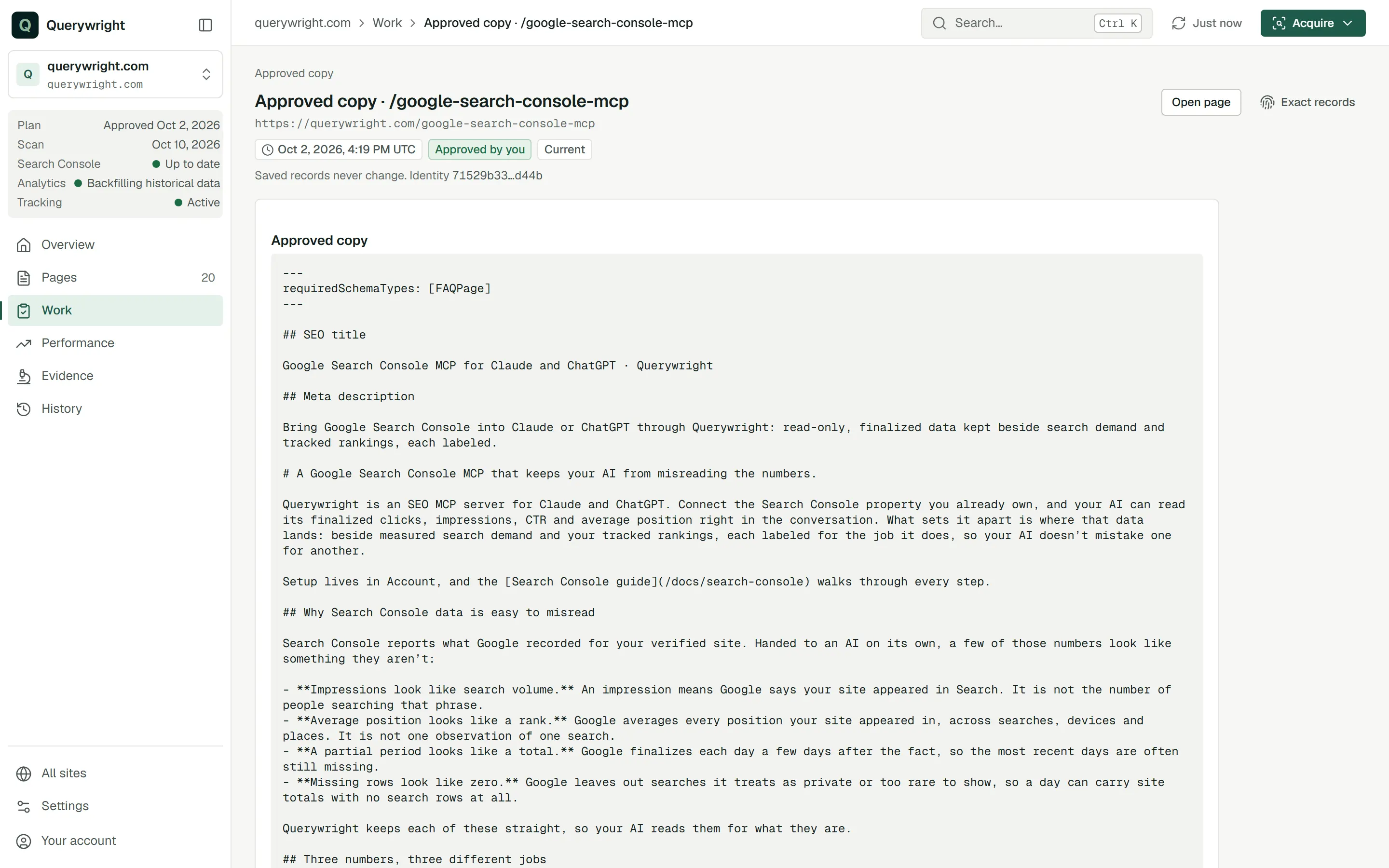
Approved copy is the exact text you accepted for a page, word for word. Querywright saves it as you saw it, and a changed word is a different version that needs its own acceptance.
Approved copy is the page text you explicitly accepted, saved exactly as your AI showed it to you. Your AI writes the copy from the writing brief, reviews it, and shows you the complete page with its findings. When you say you accept that exact version, your AI records your acceptance and Querywright saves the text, the findings you saw and the date. Accepting copy is a separate decision from approving the plan: approving a plan says what a page should target, and accepting copy says these are the words.
What your AI shows you before you accept
Your AI shows the whole page, not a summary:
- the SEO title and meta description;
- the page’s H1;
- the full body copy, with its links and calls to action as they will read.
Beside it, your AI’s review groups its findings as “Needs a fix”, “Needs your decision” and “Notes”. Unsupported facts are fixes. Conflicts with the plan, uncertainty you approved and risky promises are decisions you make before accepting. These findings are your AI’s judgment, not Querywright evidence.
If the page should carry FAQ structured data, tell your AI before you accept. The requirement is saved with the copy, and the check holds the page to it.
Change the second paragraph to mention weekend hours, keep everything else, and then that exact version is the one I accept.What Querywright records
| Field | Meaning |
|---|---|
| Approved copy | The exact text you accepted, character for character, including punctuation and line breaks. |
| Context included in your copy acceptance | The findings your AI showed you with the copy: each excerpt, explanation and recommendation, and any risk class your AI gave it. Your acceptance covers the text and this context together. |
| Lineage | The plan, the page and the writing brief the copy was written under. |
| Version | “Latest shown for this plan” for the newest version, “Earlier version” for one it replaced. Earlier versions stay available; nothing is removed. |
| Date | When you accepted it. |
If the copy is missing a required part, such as the SEO title or the H1, Querywright refuses it and saves nothing. Your AI revises the copy and shows you the new version to accept.
Acceptance covers the exact text
- Explicit. Your AI records acceptance only when you say you accept that version. Silence, approval of the plan or a yes to an earlier draft does not count.
- Exact. What is saved is the text you saw. A later edit, even a punctuation fix or a corrected link, is a new version that needs its own acceptance before it is checked.
- Separate from publishing. Approved copy is not live copy. Publishing is yours, and Querywright cannot see it happen. After you publish, a live comparison shows whether the approved copy is on the live page.
Page states about copy
| Label | What it means | What to do |
|---|---|---|
| “Ready to check” | Copy is accepted and has not been checked yet. | Ask your AI to check it. |
| “Review and accept this copy again” | A check found a decision that belongs before acceptance. | Read the decision, then accept the copy again with that decision included. |
| “Choose which version to keep” | Two versions of the page’s work (copy, a brief, a check or a live comparison) share the same latest date, so Querywright will not pick one. | Choose the exact version with your AI. |
| “Copy history needs recovery” | The page’s accepted-copy history could not be read completely, so the App does not say whether approved copy exists. | Ask your AI to recover the exact history before continuing. |
“Review and accept this copy again” is the page’s next-action button; the other three are page statuses.
What it does not claim
Where it shows in the App
- On a page, the journey strip marks “Copy approved” with the date you accepted it.
- The saved copy is an “Approved copy” record in History and on the page’s History tab, where replaced versions are marked rather than removed.
What you decide
Does it use allowance?
No. Writing, reviewing, accepting and revising copy use no allowance.
Last updated